

Hey, I'm Waël BouabdaWaël.I shape products, from the idea to the interface.

Twelve years in design, the last two and a half freelance after eight years in-house. I come in early, when the product is still taking shape, and work alongside the founders: branding first, then the structure, the flows, the interface. I can start from your repo or a blank Figma.

Selected work
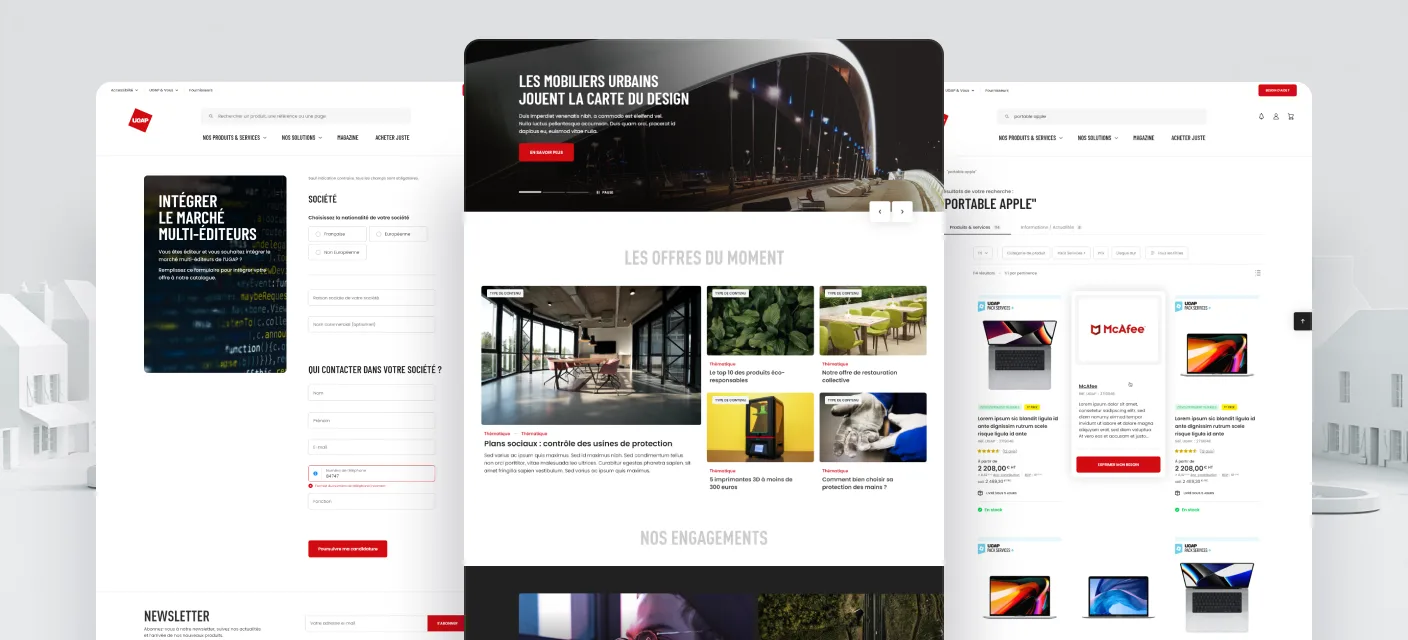
UGAP e-commerce screens: catalogue, request management and the bespoke quote workflow UGAP brand cover: the red UGAP logo over a white architectural render UI/UX · Front-end UGAP A modern redesign of France's central public-procurement platform, business logic and all, down to RGAA AA accessibility.
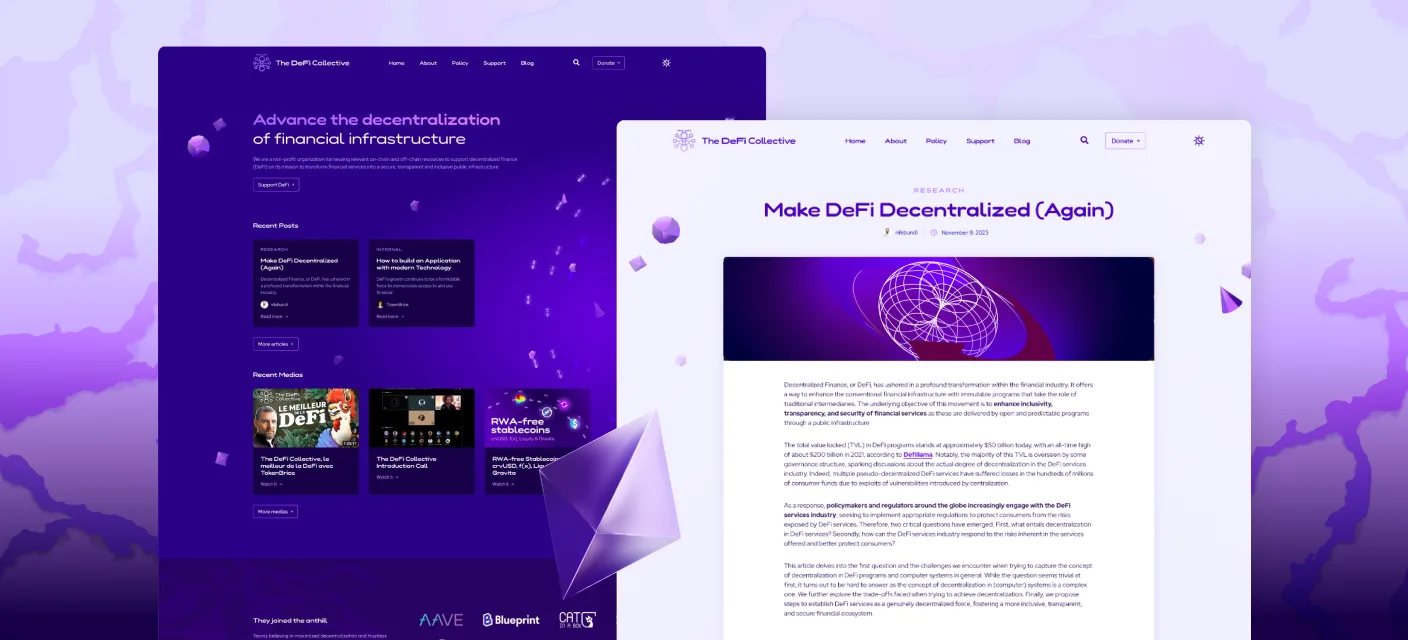
DeFi Collective site screens: landing, articles and research pages DeFi Collective brand cover: the DeFi Collective logo and wordmark on a purple gradient Visual identity DeFi Collective Brand identity and a blog redesign for a Swiss non-profit working on on-chain finance.
Services
Brand identity

Identities that stay recognisable everywhere they land, built as a system, not a logo in isolation.

Start one. Naming, logo, lettering and the full system, from first sketch to guidelines.

Sharpen one. Take a brand that drifted and pull it back into one consistent voice.

Affinity Adobe CC Midjourney Krea ComfyUI
Product design

Dense products made legible. I solve the hard screens, structure the information, and keep the whole experience coherent, for fintech, AI and SaaS.

Zero to one. Shape a product from the first flows and screens, with a design system underneath.

Untangle. Step into a product that grew complex and make it readable again.

Figma Cursor Claude Anytype Hermes
Design ↔ code

I meet your project where it is and work in both directions, so nothing drifts between the design and the product.

Design → code. Design it, then build the front-end in the repo next to your engineers.

Code → design. Come in from an existing repo or a fast prototype, give direction or fix it hands-on.

Next.js Tailwind shadcn/ui Vercel GitHub Framer Claude Code
Side projects
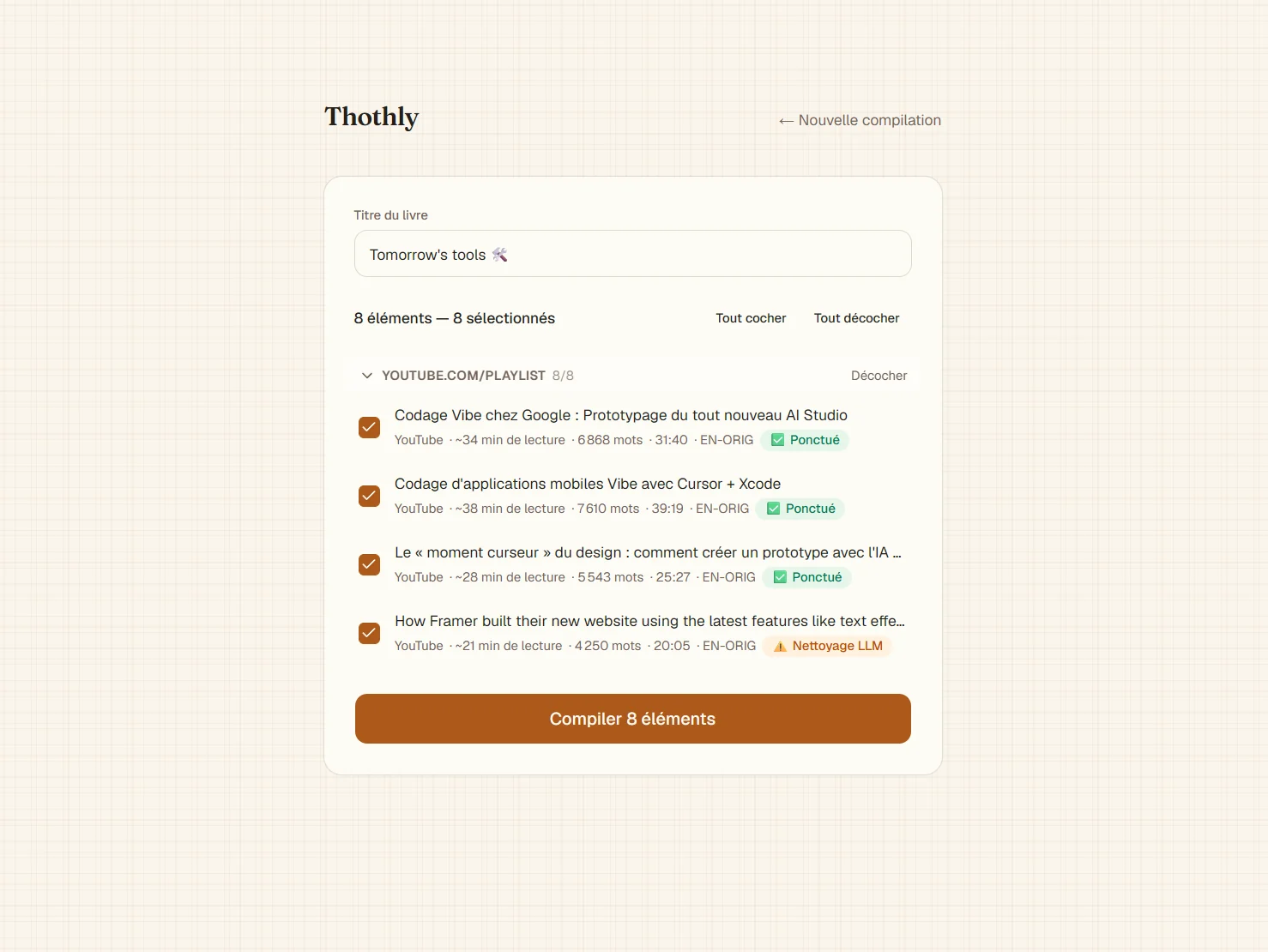
Thothly interface: a compilation screen turning a YouTube playlist into a book, with selected items and word counts Thothly Turns videos, podcasts and articles into clean EPUBs. An open-source reading pipeline.
Burin in action: a photo on the left and the same image rendered as a line engraving on the right, split by a slider Burin A browser engraving tool. Line-by-line hatching rendered in real time with WebGL.
Writing
A modular AI stack for people who care about design How a self-hosted, multi-agent setup fits into a designer's workflow without flattening the craft.
Contact

Open to freelance missions and full-time roles, remote or in Paris. Email is the best way to reach me.

wael.bouabda@proton.me
Paris, France English · Français

Lagoon Finance

6 min read

Lagoon is on-chain vault infrastructure: asset managers build and run curated strategies, depositors put money in to earn. Everything underneath is public and verifiable, but most apps hide it behind a clean screen and a confirm button. You deposit and you're left guessing where your money actually is. I designed the app to do the opposite, and show what's really happening at each step.

RoleFounding designer
ScopeBrand · Product · Design system
Outcome$300M+ deposits at peak

Context

Lagoon runs curated on-chain vaults on Ethereum and other EVM chains. I came in as the founding designer and owned the product, the brand and the design system.

The problem

Every number on screen is a reason to deposit or to leave: APR, composition, NAV, fees. If any of them is vague, someone pulls their money. Three things were hard to show.

Money moves on a delay. A deposit doesn't become a position when you click confirm. It settles at the next valuation, once the curator approves. Most apps paper over that wait with a fake success screen. I had to show the wait honestly instead.

Yield is not one number. What you earn is a base return plus separate reward streams from the protocols the vault touches. Folding all of it into a single APR hides where the money comes from.

A vault is a set of addresses. Who can value it, who can upgrade it, where fees go, what is locked: all of it is on-chain, and most apps never surface it.

Role & scope

Founding designer. I owned the product design end to end: the UX/UI, the flows, and the design system, from the first screens to a shipped library. That ran across both sides of the app. The curator side, where vaults are deployed, configured and operated, is a denser and more complex workflow than the depositor side, and I designed all of it; this case stays on the depositor experience and only samples the curator tooling. The specs came from the CTO, one of the cofounders, and my job was turning them into the actual interface and system. Outside the product itself, the brand identity and the marketing assets (landing page included) were mine too. The app's front-end was built by the engineers.

Two users, one surface

Two groups use the same app for opposite reasons. A depositor wants to know what they get and what they risk before moving money. A curator wants fine-grained control over how a vault is built and run. I kept the journeys structurally apart: a depositor goes Earn, then Vault detail, then Portfolio; a curator goes Create, then Configure, then Operate.
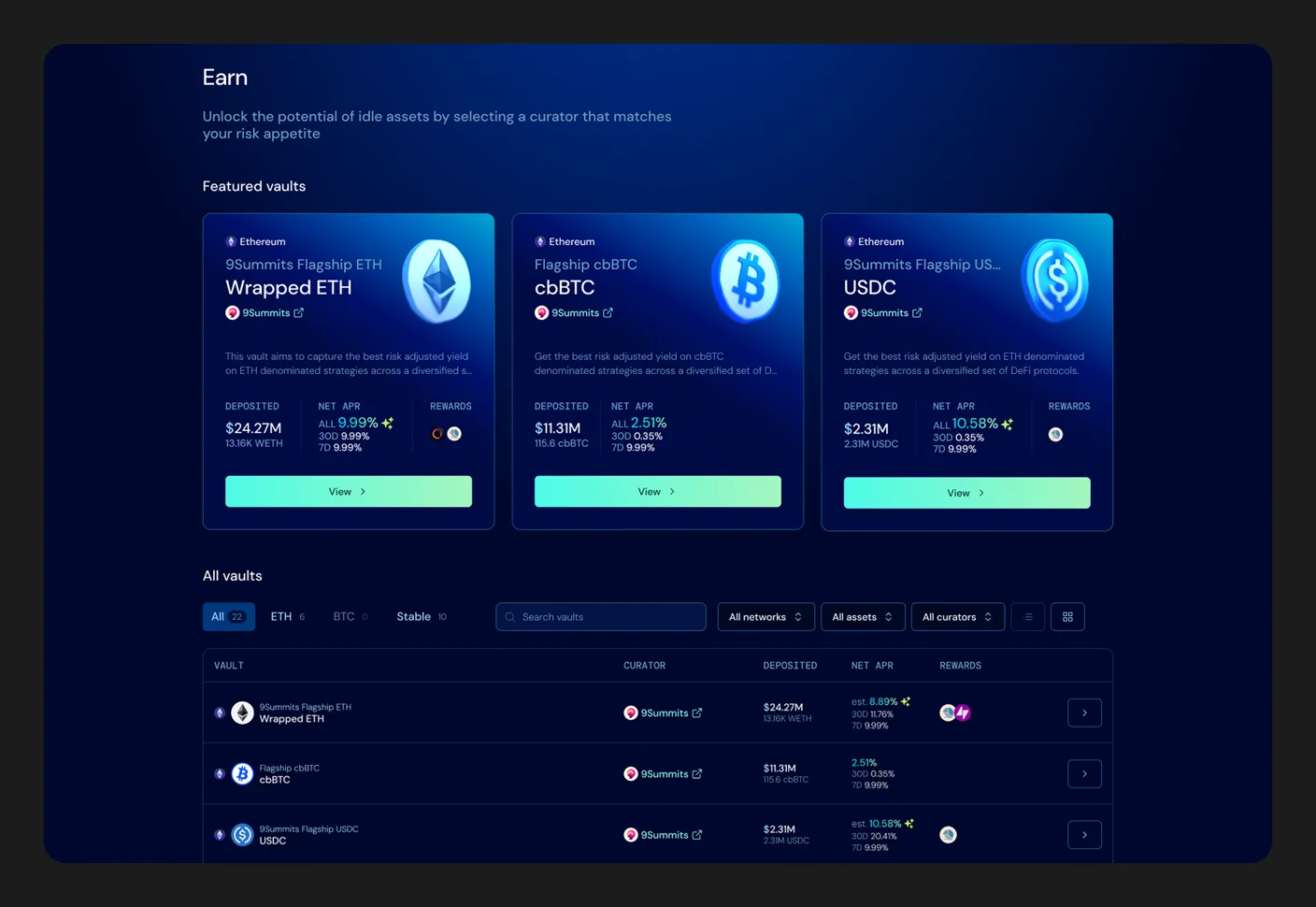
The Earn page: three featured vault cards with APR and TVL, above a full vault table with asset tabs and filters by network, asset and curator
Earn, the depositor's front door. Featured vaults first, then the full list, filterable by network, asset and curator. The navbar carries the protocol's live TVL.

Show where your money is

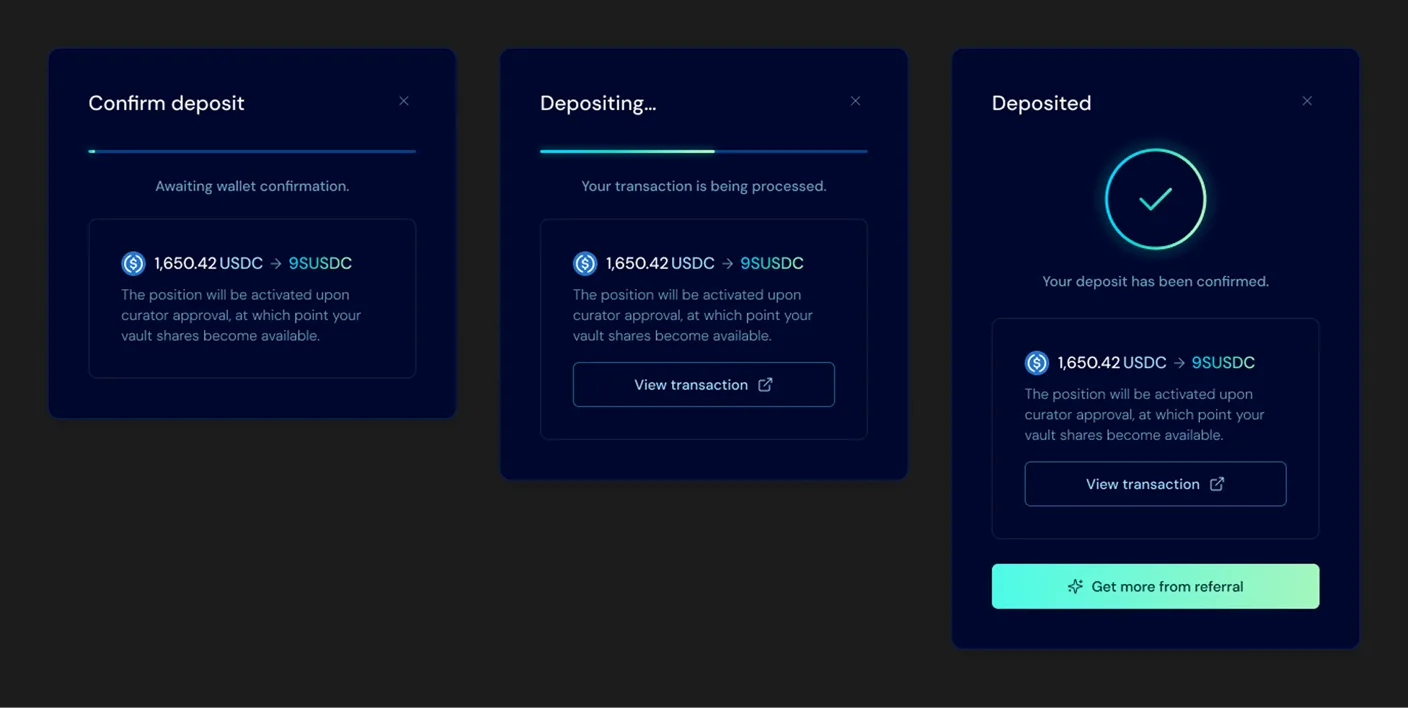
Because deposits and redemptions settle on a delay, one confirm button wasn't enough. I modelled the money-movement layer as an explicit state machine. Four processes (Deposit, Redeem, Claim, Withdraw), each going Confirm, then Loading, then End. Here is the deposit one.

Say what's happening with timing. The confirmation reads, word for word: "The position will be activated upon curator approval at which point your vault shares become available." That sentence stays on screen through loading and completion. There's no fake success the second you click.

The deposit flow in three modal states side by side: Confirm deposit (awaiting wallet confirmation, 1,650.42 USDC to 9SUSDC), Depositing (transaction processing), and Deposited (confirmed), each repeating the notice that the position activates upon curator approval
The deposit, stated the same way at every step: Confirm, processing, done, with the curator-approval condition repeated through all three. No fake success the second you click.

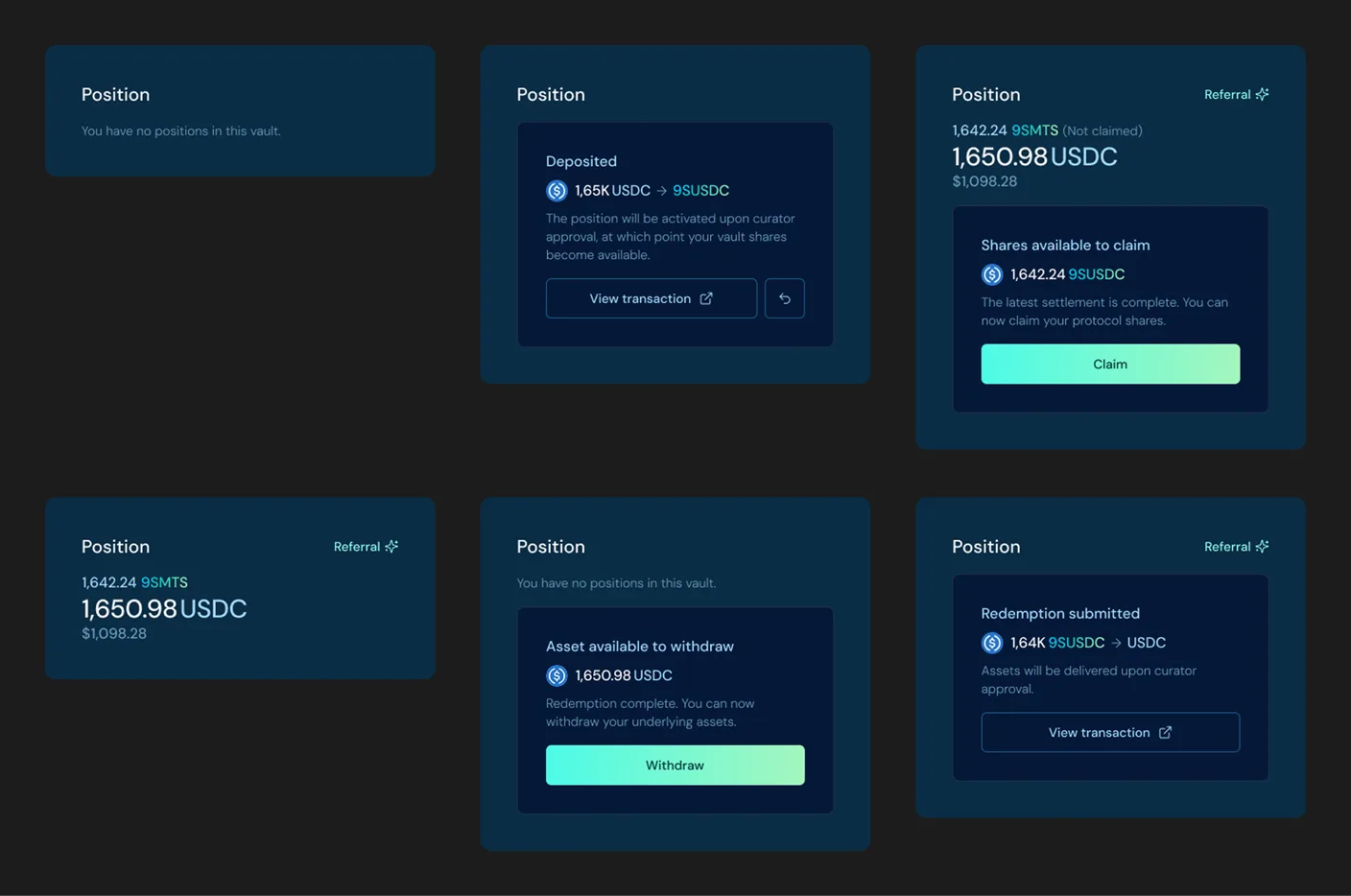
Never hide where a request is. Back on the vault page, the position panel reflects every step as a named state, through the full cycle of a position.

The position panel in its six states: no position, deposit pending curator approval, shares available to claim, an active position, redemption submitted, and assets available to withdraw, each labelled with its amount
Every state of a position, named: none, deposit pending approval, shares to claim, active, redemption requested, assets to withdraw.

The Portfolio page repeats the same logic at the account level: total deposited, net APR, total earned, and every position with its status, pending requests included.
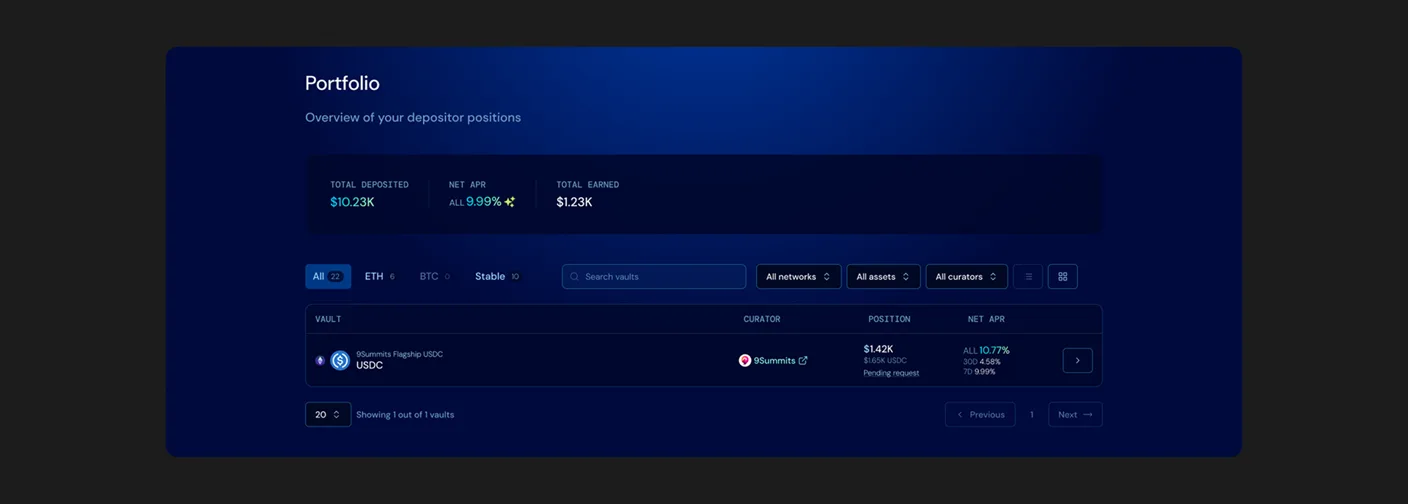
The Portfolio page: total deposited, net APR and total earned in a summary strip, then a table of positions with curator, value and a pending request status chip
Portfolio, the account-level read: three totals, then every position with its status. A pending request shows up as a state.

Show what you're actually earning

The performance chart was the hardest part to keep honest, for two reasons.

The price moves in steps, not curves. A vault's price per share only changes when the curator settles a new valuation, then holds flat until the next one. So the chart is a staircase: each tread is the stretch between two settlements, where the price is fixed and known.

Not all the return lands in the price. Vaults earn extra reward streams from the protocols they use, and those rewards belong to the vault and its depositors, but they don't show up in the price per share. A chart that plotted only the share price would understate what the vault actually returned.

So I kept the price-per-share line stepped as it is, and overlaid each reward stream as its own band on top, with a reward-adjusted total. On hover, a single day is itemised: price per share, each reward source by name, and the adjusted figure. In the example, 1.09 USDC of price per share plus 0.15 from Resolv and 0.05 from TAC gives 1.29 reward-adjusted.
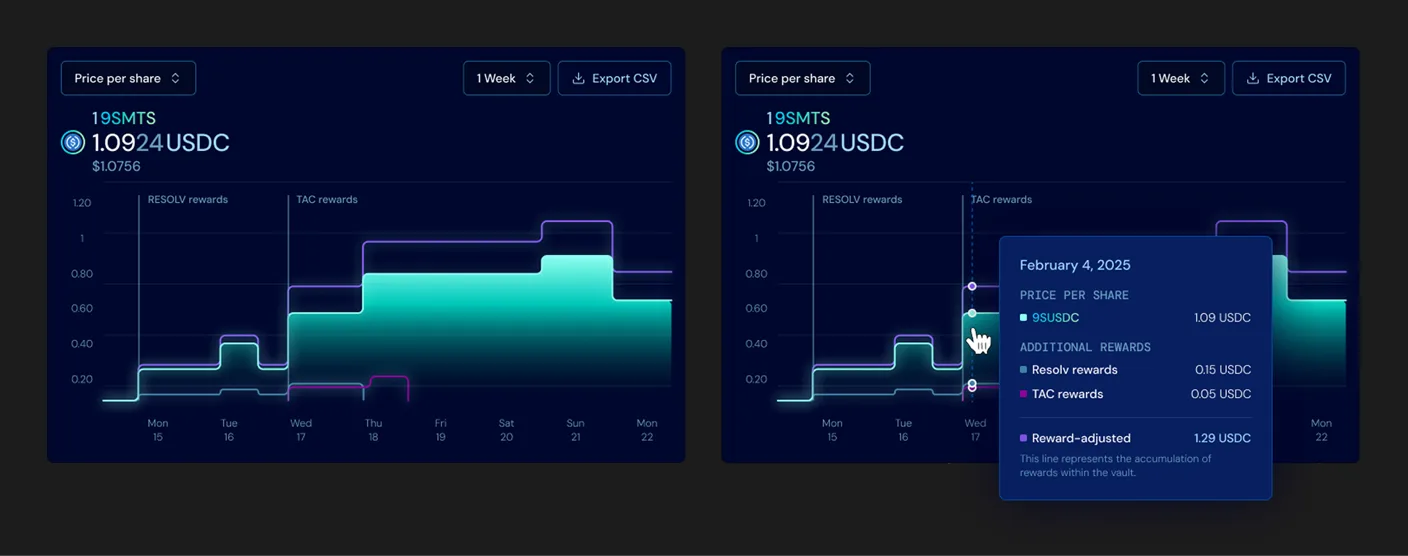
The performance chart in two views side by side: the stepped price-per-share line with RESOLV and TAC reward streams overlaid as bands, and the same chart on hover with a tooltip itemising price per share 1.09 USDC, Resolv 0.15, TAC 0.05, and reward-adjusted 1.29 USDC
The price-per-share line steps at each settlement, with the reward streams as their own bands above it. On hover, the day breaks out: base price, each reward by name, reward-adjusted total.

The same applies to the APR. Rather than one headline percentage, it unfolds into its sources, each explained inline where it appears: a base yield from the strategy, additional vault rewards (Resolv, TAC), external reward tokens, and points incentives.
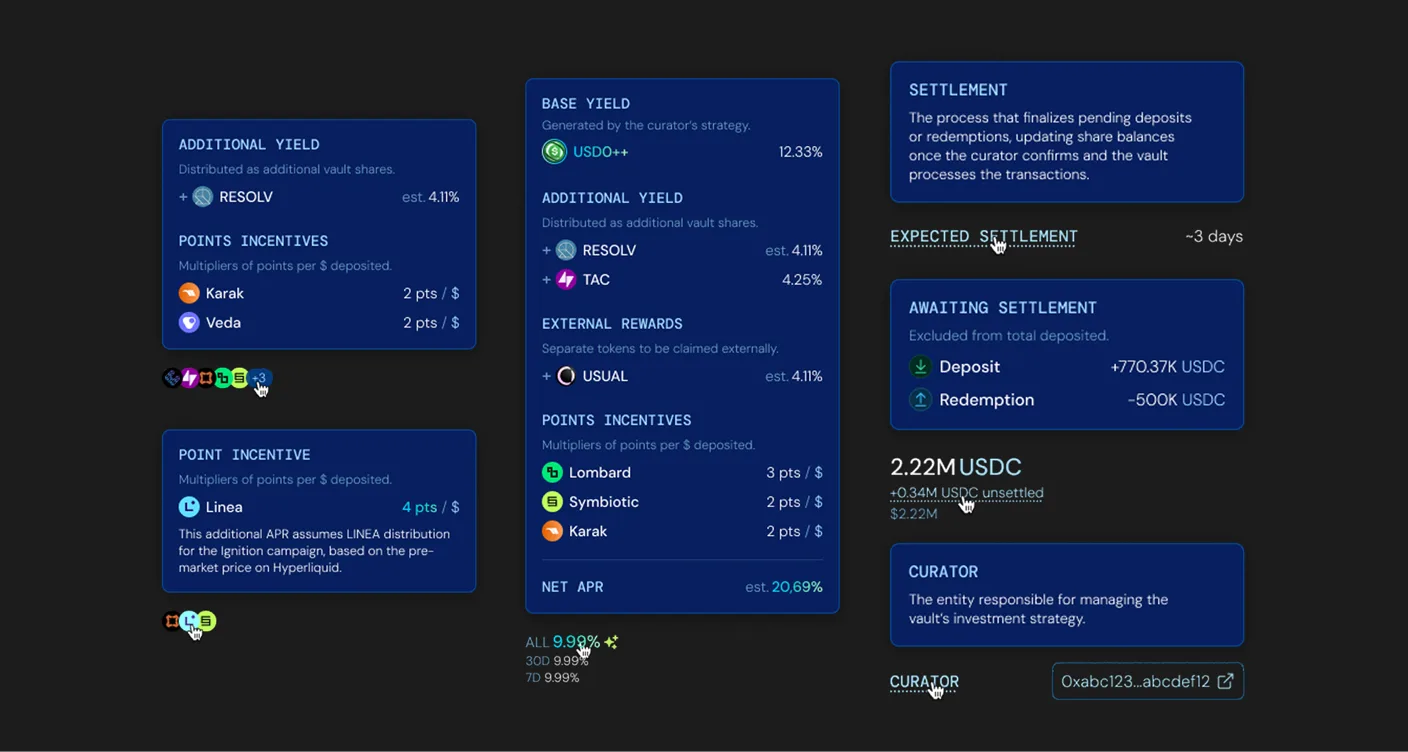
Inline explainer tooltips for the APR: base yield 12.32%, additional vault rewards from Resolv and TAC at 4.25%, external rewards such as Usual, and points incentives from Lombard, Symbiotic and Karak, adding to a net APR of about 21.69%, alongside tooltips explaining settlement, awaiting-settlement balances and the curator role
The APR opened into its sources: base yield, additional and external rewards, and points, with inline notes on settlement and roles.

Show what's under the hood

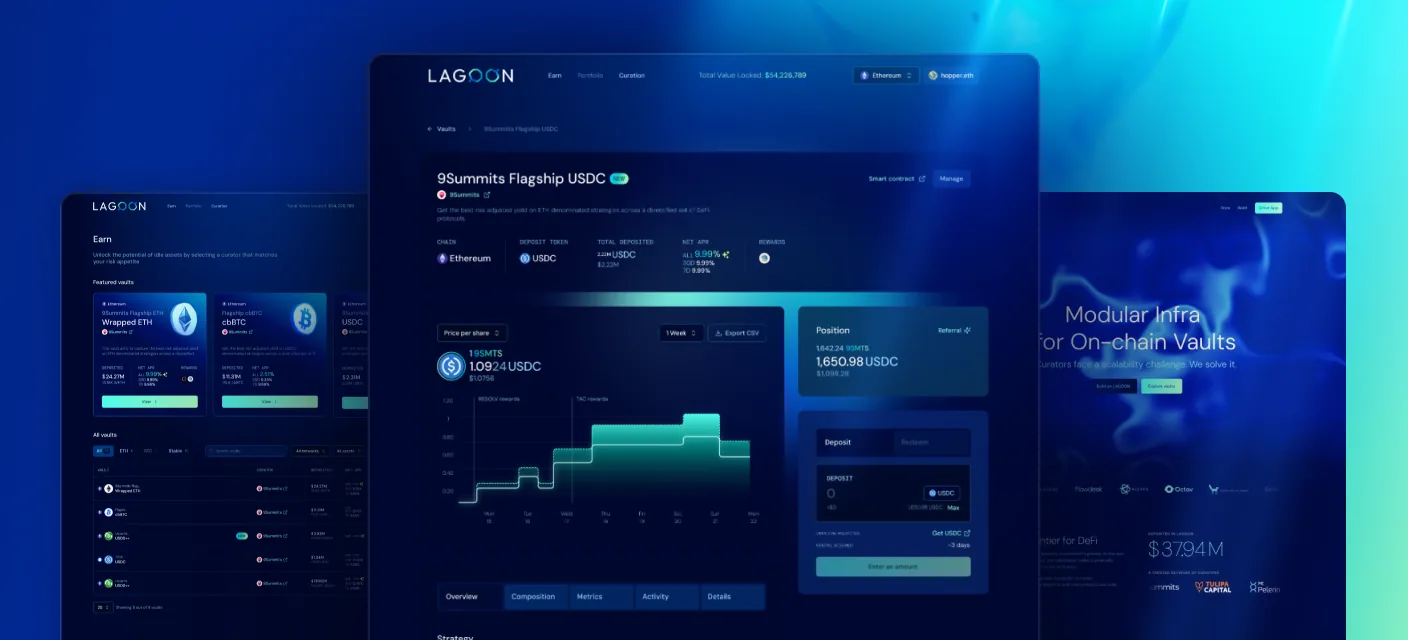
The vault page opens on a top-down read: identity and headline figures first (name, curator, network, asset, APR, TVL), then the chart, with a Position panel pinned to the right. Everything else sits in five tabs.

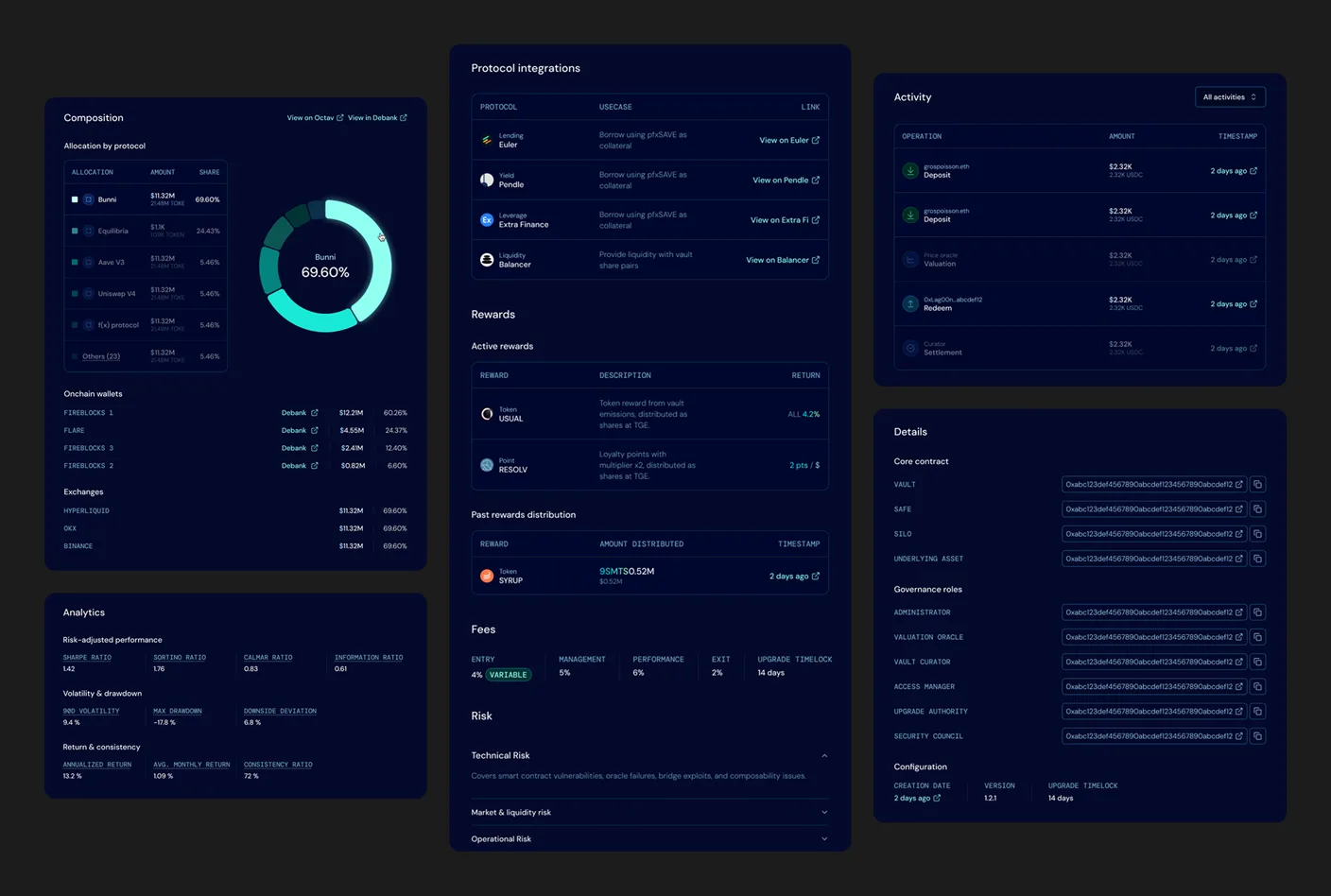
Overview lays out the strategy, the protocols the vault touches, the active and past rewards, the fees, and the risk categories. Composition shows where the capital sits, by protocol and by token, down to the on-chain wallets and exchanges that actually hold it. Metrics carries the risk-adjusted numbers: Sharpe, volatility, and the max drawdown an APR alone hides. Activity is the full log of deposits, valuations, redeems and settlements, each with an address and a timestamp. Details lists every contract and governance role with its address.
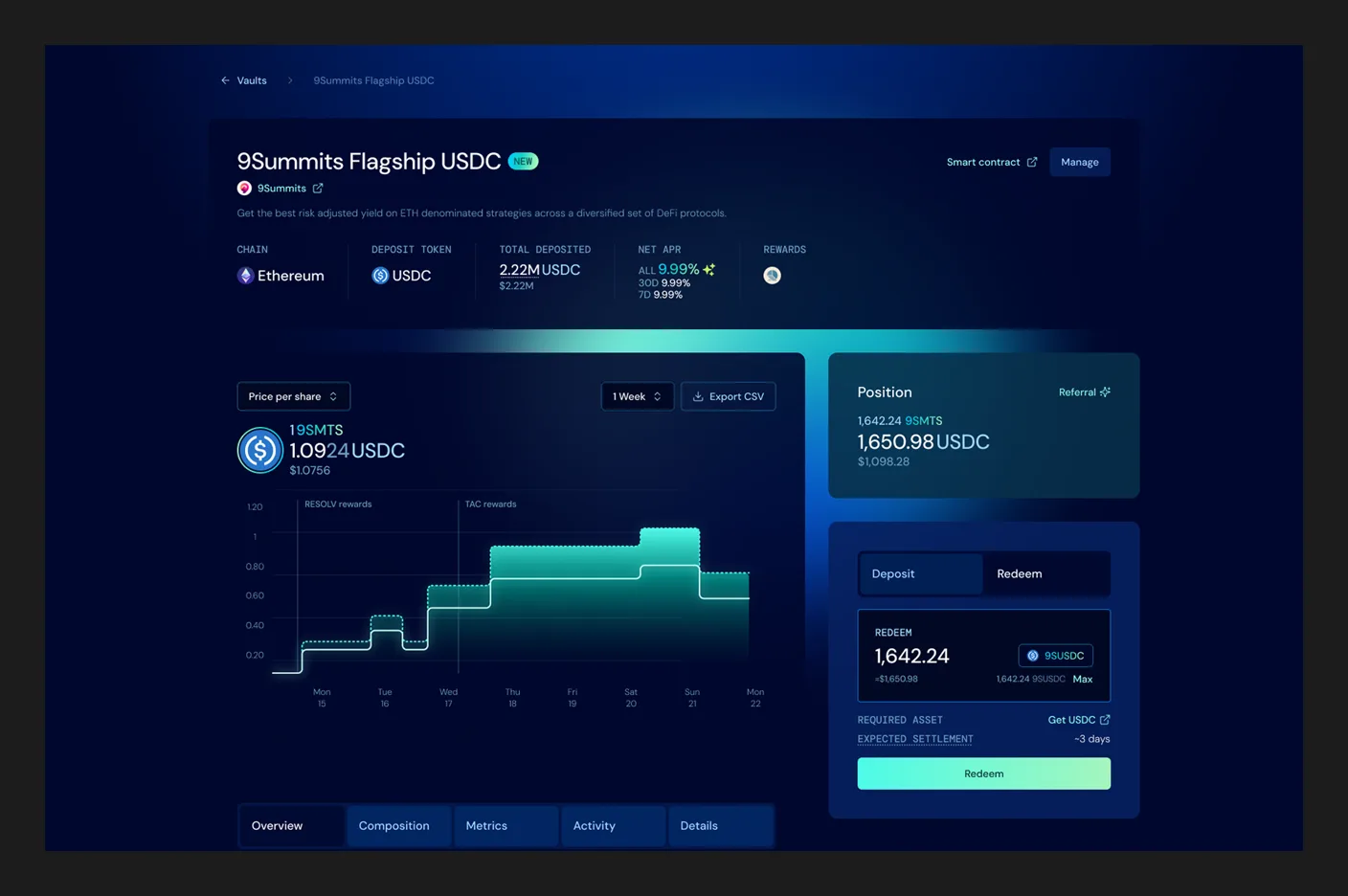
The 9Summits Flagship USDC vault page: name, curator, chain, deposit token, total deposited, net APR and rewards in the header, the stepped price-per-share chart on the left, the position panel with Deposit and Redeem on the right, and the Overview, Composition, Metrics, Activity and Details tabs below
The top of the vault page: identity and headline figures, chart and position panel side by side, then the five tabs below.
The vault tabs opened out on one board: Composition (allocation by protocol and token with a donut, down to the on-chain custody wallets and exchanges), Protocol integrations, active and past Rewards, Fees, Risk categories, the risk-adjusted Metrics (Sharpe, drawdown), the full Activity log, and the Details tab with every contract and governance role address
The five tabs, opened out: composition down to the custody wallets, the protocols, rewards, fees and risk, the risk-adjusted metrics, the full activity log, and every contract and role address.

Tell people when a vault isn't vetted

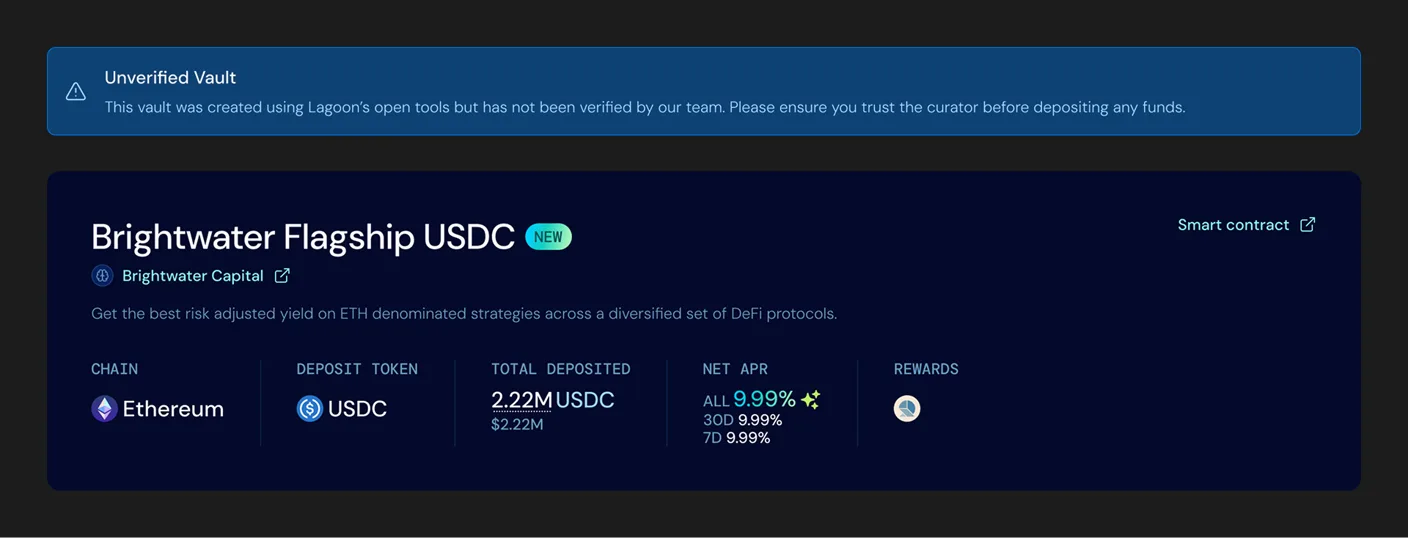
Anyone can deploy a Lagoon vault, and any vault is reachable by its URL. The vaults shown inside the app are a curated set the team has looked at, but a depositor can still land on an unvetted one by following a link. A vault the team hasn't verified carries a banner: it was built with Lagoon's open tools, it hasn't been checked, and you should be sure you trust the curator before depositing. The vault's own figures stay visible right under the banner.

An unverified-vault banner above a vault header: the banner says the vault was created using Lagoon's open tools but has not been verified by the team and to ensure you trust the curator before depositing, shown above the Brightwater Flagship USDC header and its figures
The banner I designed for an unverified vault reached by URL. It sits right above the vault's own figures.

The same checks, for the curator

A curator's actions are high-stakes and mostly irreversible, so the tooling makes each one checkable before it goes on-chain. Vault creation ends on a review screen that puts every address and every locked parameter in one place (the roles, the fee rates, the rate-change and upgrade timelocks) before the deploy transaction. Pricing the vault works the same way: a simulated NAV the curator reads before settling it on-chain.

Vault deployment review screen: vault information, roles and fee structure recapped with their on-chain addresses, the rate-change and upgrade timelocks, and a deploy button, all on one screen before the transaction
The deployment review: every address and locked parameter on one screen before the curator signs.

The design system

I built a component library that covers the real states, not just the happy path: deposit and redeem inputs with their variants, vault table and card views, composition and activity tables, four chart variants, position and action panels, transaction modals, six toast states, alerts, tooltips, plus the curator-only pieces (whitelist, deposit limit, rewards, referral). The product is desktop-first on purpose: like most DeFi apps, the real work happens at a desk, where people manage actual money.

Outcome

At peak, the protocol held more than $300M in deposits.